
SoterAI Browser Extension is live
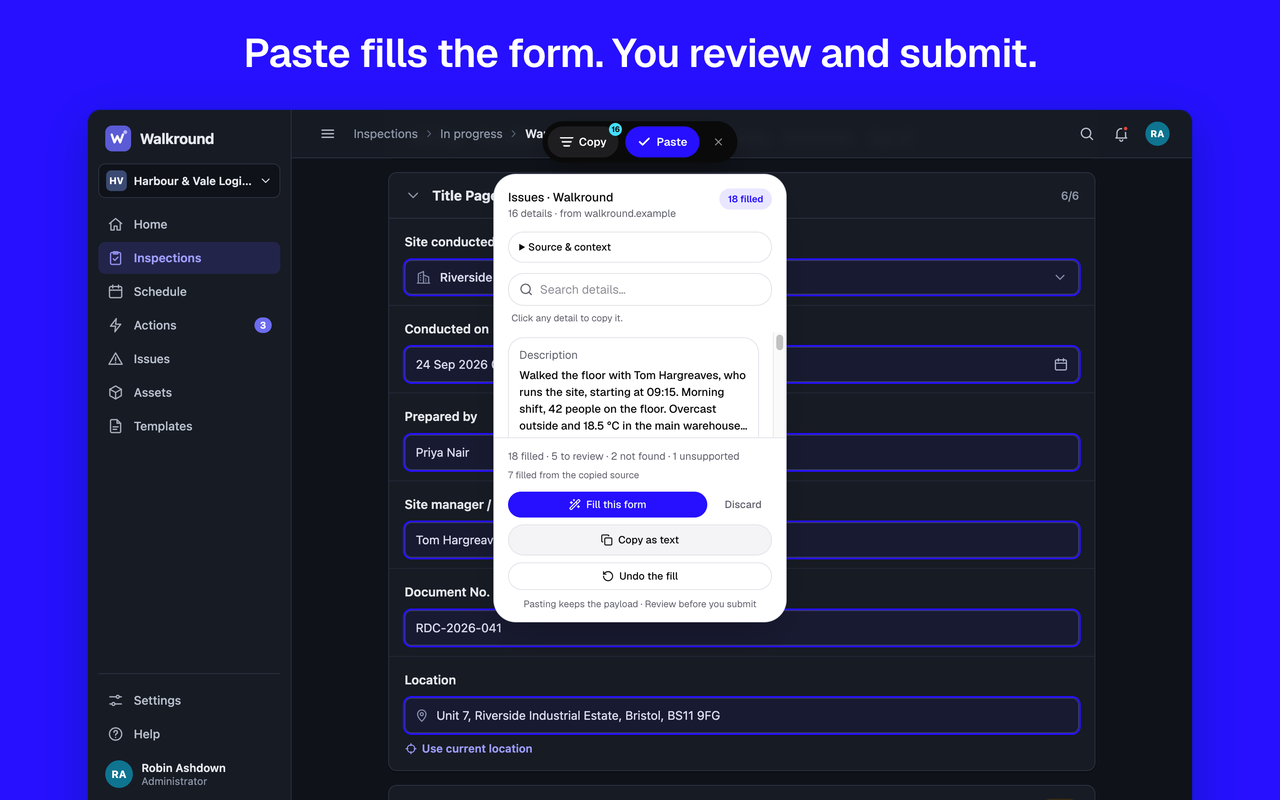
The SoterAI Browser Extension is now available for Google Chrome. It carries what you worked out in an AI chat to the next web form you fill in. Copy a ChatGPT, Claude or SoterAI chat, open the form, and Paste fills the fields it can match. You review every field and submit the form yourself.
SoterAI Browser Extension
What it is
- On ChatGPT, Claude and SoterAI, the SoterAI card sits at the top of the page. Press Copy, then This conversation, to save the chat you have open. Copy keeps it in your browser and sends nothing.
- On a web form, press Paste, then Fill this form. Paste fills the obvious matches on your device, then, when you are signed in, asks SoterAI to match the fields that are left.
- Paste writes only values it can trace to your copy or your saved details. Anything less certain is marked on the page as a suggestion, and filled only when you click it.
- Paste never submits a form or presses send, and never overwrites a field that already has a value. A summary such as “9 filled · 2 to review · 1 kept · 3 not found” shows what it did.
Who it's for
SoterAI customers who work an answer out in an AI chat, such as an incident write-up, a claim summary or inspection notes, and then have to type the same names, dates and numbers into a web form or portal. It needs a SoterAI account.
How to get it
It runs in Google Chrome on a computer. Sign in at ai.soter.com in the same browser and the extension uses that sign-in.
Further documentation
SoterAI Browser Extension privacy policy
Have questions about the SoterAI Browser Extension? Contact your account manager or reach out to our support team for help getting set up.
Was this article helpful?